
For drivers, coaches and engineers
Faster laps start
with better data
Telemetry, driver feedback and AI coaching in one place, for better decisions on the next run.
- 1. UploadYour telemetry file
- 2. AnalyseAI finds the time and the key improvements
- 3. ImproveApply the feedback and go faster
Works with VBOX, MoTeC, AiM and Cosworth logs. The demo is free, with no account needed.

Everyone in the garage, working from the same data
Drivers, coaches and engineers each get what they need from the same session, and the Team plan puts it all in one place.
Drivers
Know exactly where the time is.
- Where every lap gained or lost time, corner by corner, against your best lap or a teammate's
- An AI debrief with a plan for the next run, on your laptop or your phone in the paddock
- Tell it how the car felt and get setup changes to try
Coaches
See how your driver drives, not just how fast.
- Driving style lap against lap: the braking, the throttle, the steering and the fast corners
- Your driver's laps against a reference, yours or another driver's, on the map and the traces
- Race pace and consistency across every stint, with notes and PDF reports to send them
Engineers and team managers
Every driver's data in one library.
- A Team plan with five driver logins, who send you their sessions, notes and reports
- A folder for each driver, so you always know whose file is whose
- Setup advice from the driver's feedback, checked against the data, and reports with your team's logo
Plans and prices
Every plan includes everything: VBOX, MoTeC, AiM and Cosworth files, four-lap comparison, the cloud library, PDF reports, AI debriefs and questions. Prices include VAT where it applies.
Pro Monthly
For the season. Cancel any time from your account.
- 2 devices, for example laptop and tablet
- 60 AI debriefs and questions a month
- Unlimited sessions in your library
Pro Yearly
Everything in Pro Monthly, and you save 17% (£59.89 a year) against paying monthly. Cancel any time from your account.
- 2 devices
- 60 AI debriefs and questions a month
- Unlimited sessions in your library
Team
Your team account, plus 5 driver logins you hand out: driver1.yourteam to driver5.yourteam, each with a password you set.
- 5 driver logins, each with their own library and notes
- 300 AI debriefs and questions a month, shared by the team
- Team account on 5 devices
Payments are taken securely by Stripe. A device is a browser you sign in on; you can swap devices from your account. The demo sessions in the app are free to explore without an account.
An AI race engineer that tells you why
CircuitPT measures how you drove every corner: where the brake goes on and comes off, how far you trail it, any coasting, and when you are back on the throttle. The AI reads all of it, against your quickest laps and your earlier sessions, and explains what cost you the time.
- Why, not just where. Your losses, explained from your technique: squeezing the brake on instead of hitting it, letting it go with no trail braking, a late apex, a slow pick-up, a full lift where a partial one would do.
- Patterns you would miss. The same habit across corners, laps and sessions, picked out for you.
- Ask it anything. "Why am I slow in T4?" "Am I coasting anywhere?" It looks up the exact laps and corners to answer.
- It remembers. It compares today with your earlier sessions at the same track, and your notes from those days.
- Private. The AI is sent the numbers CircuitPT measured, never your raw log.
- Included. 60 AI debriefs and questions a month on Pro, 300 on Team.
AI DEBRIEF
Your best lap was 0.84 s off Driver 2's, most of it on the corner exits. The change worth the most: going from the brake to the throttle without the coasting gap.
WHAT WENT WELL
- T4 right: you gained 0.09 s on Driver 2 with the better exit.
- Into T10 and T11 you braked as late as Driver 2 and carried more speed to the apex.
WHERE THE TIME GOES, AND WHY
- T13 right: you coasted between the brake and the throttle, so you were slower out of the corner and down the straight (0.17 s).
- T8 right: you were slower to full throttle, so you carried less speed down the next straight (0.15 s).
- T1 right: you were slower through the apex, and that carried all the way out of the corner (0.13 s).
PATTERNS
- In six of the 14 corners you spend longer on neither pedal between the brake and the throttle; Driver 2 rolls straight from one to the other.
- Through T2 you lifted where Driver 2 stayed flat, costing a few hundredths.
PLAN FOR THE NEXT RUN
- T13: go from the brake straight to the throttle, without the coasting gap.
- T8: get to full throttle sooner on the exit.
- T1: carry more speed through the apex.
From the car to a debrief in three steps
Drop in your files
Every session from the day: practice, qualifying, a teammate or a coach. VBOX, MoTeC, AiM and Cosworth logs can sit side by side.
Line up the laps
Tick up to four laps. The quickest becomes the reference, and every corner shows where the others braked, turned and got back on the power.
Ask the AI
Your biggest losses land in a notepad straight away. Press AI debrief for the why and a plan for the next run, or ask the AI your own questions. Export it all as a PDF.
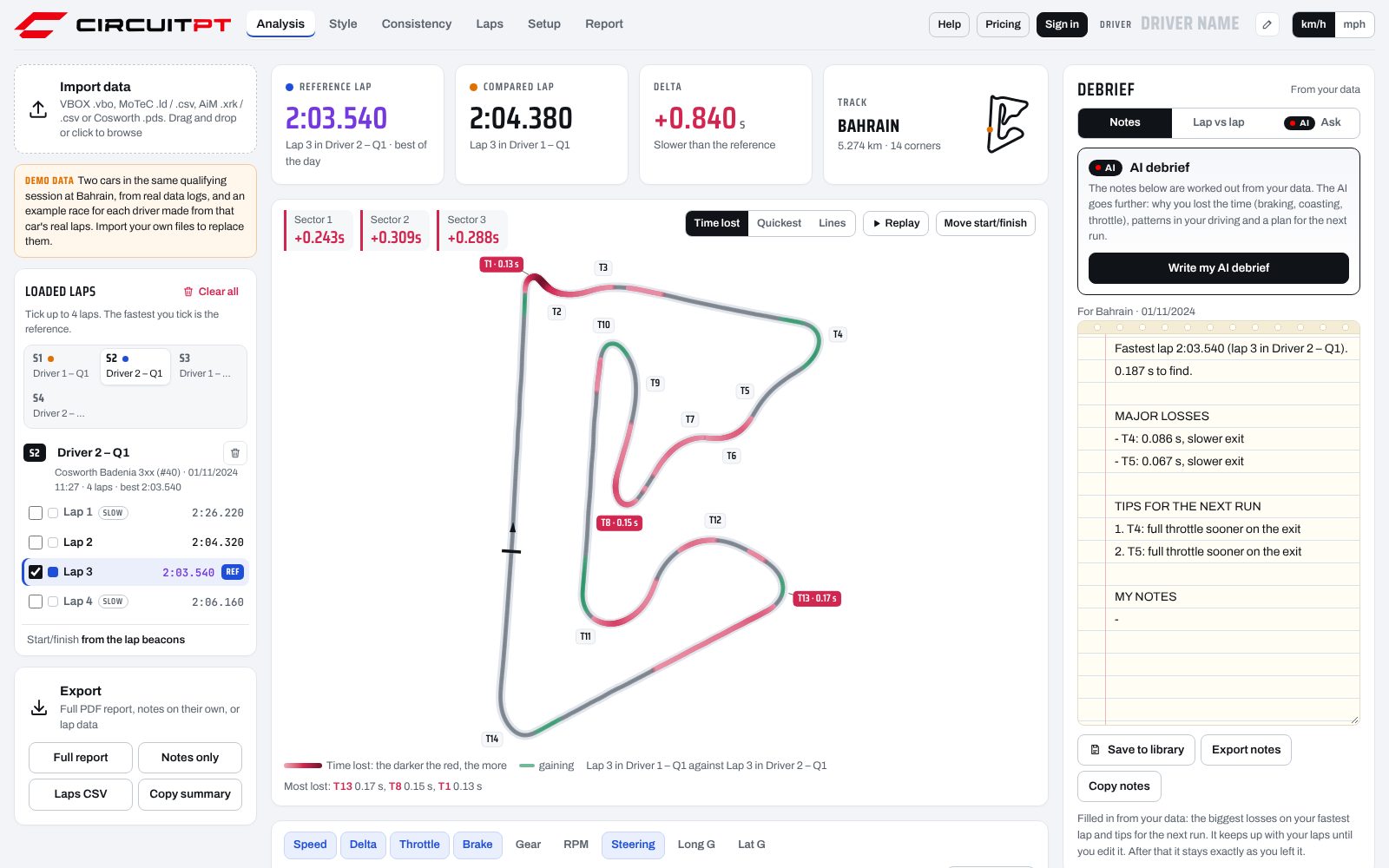
The demo in the app: real data from two cars in the same qualifying session at Bahrain. Open it yourself, no account needed.
What it reads, and what it tells you
- Your files
- VBOX .vbo from any GPS VBOX, including video units. MoTeC .ld with its .ldx lap markers, or CSV exported from i2. AiM .xrk and .xrz straight from Race Studio, Race Studio 2 .gpk with its .drk, or a CSV export. Cosworth Pi Toolbox .pds, as used in Porsche Cup cars, with or without GPS. Throttle, brake pressure, gear, rpm, steering and g channels are picked up by name.
- Laps
- Lap and sector times, theoretical best, consistency and pace fade, across every session you load. Start/finish comes from your logger, or click the track to set it.
- Corners
- For each corner: braking point, minimum speed, exit speed and peak braking g, lap against lap, with the time gained or lost on entry and exit.
- Comparison
- Up to four laps overlaid on the map and the traces, from the same session or different days. The track map turns red where time is lost, darker where more goes, with the three costliest corners marked; or shows which lap was quickest through each part. Replay the laps round the map together and watch the gap open and close, for the whole lap or just one corner.
- Technique
- For every corner on every lap: brake on and off, trail braking, coasting, minimum speed and where it happens, throttle on and full throttle, gear. With pedal channels logged, also the shape of every stop (how hard and fast the brake goes on, the peak pressure, how it is released), part throttle through the corner, how quickly the throttle is picked up, and every lift, full or partial, with what it cost. With a steering channel, the turn-in, the lock, corrections and catches, and when the wheel unwinds against the throttle. Without pedal channels, braking and acceleration are estimated from GPS.
- Driving style
- A profile of how you drive, on scales that read the same at any track: how the brake goes on and comes off, the gap to the throttle, how the throttle goes on, the fast corners, the steering and how repeatable it all is. Side by side with a teammate or your earlier sessions, with the corners where you drive most differently, and the AI to tell you which differences cost time.
- Race pace and consistency
- Every lap of a stint on one chart with its trend line, several sessions at once. A consistency score out of 100, how your pace evolves through the run, and how much each stint fades once the fuel burnt is allowed for, so you see what the tyres are really doing. In and out laps and anomalies over 1.5 seconds are left out, and the AI gives you race pace feedback on the stint.
- AI debrief
- The AI explains why you lost the time, finds patterns in your driving and writes a plan for the next run, with targets. It lands in a notepad that also fills itself with your major losses, and stays exactly as you edit it.
- Ask the AI
- Ask about your laps in plain English. The AI looks up the laps, corners and channels it needs, and remembers your earlier sessions at the same track.
- Setup advice
- Tell the AI how the car felt: understeer or oversteer on entry, mid-corner and exit at slow, mid and high speed, plus braking, traction, kerbs and tyres. The AI checks what you felt against your data and suggests up to three setup changes, most valuable first, with how much to change and what you should feel.
- Reports
- A full PDF report, notes on their own, or lap data as CSV for your engineer. Add your own or your team's logo in your account and it goes on the reports and the race report in place of ours.
- Library
- Every file you import is saved, compressed, to your private library, so you can open it again on your laptop at home or the tablet in the garage.
- Privacy
- The analysis runs in your browser. The AI receives the numbers CircuitPT measured, never your raw data.
Questions
Which loggers does it work with?
Any Racelogic VBOX that records GPS (.vbo files). MoTeC loggers with GPS: drop the .ld together with its .ldx file, or export a CSV from MoTeC i2. AiM loggers with GPS, such as the MXm, MXS, MXL2 and Solo 2 DL: drop the .xrk or .xrz file straight from Race Studio, or export a CSV. Older Race Studio 2 sessions (MyChron and others) work too: drop the .gpk file together with its .drk. Cosworth loggers: drop the .pds file from Pi Toolbox. Cars without GPS, such as Porsche Cup cars, work too (see below). CSV exports from other loggers usually work too, with GPS latitude and longitude or at least a speed channel.
Does my logger need GPS?
No, but it helps. Without GPS, CircuitPT uses the car's own speed for distance and the logger's lap markers for laps (or finds the laps in the speed trace when there are none), so lap times, sectors, corners, traces, notes and the AI debrief all work, with laps lined up by distance as in Pi Toolbox or i2. The track map is rebuilt from the yaw rate or lateral g sensor, and shown once CircuitPT knows the circuit: at 40 international circuits, from Bahrain to Silverstone, Spa and COTA, it recognises the track from the shape and puts the map on the real circuit. If the circuit can't be recognised, the session still runs, just without the track map. What GPS adds is the real racing line, so you can see where each lap went wide.
Where does my data go?
Your files are analysed in your browser. A compressed copy is kept in your private library so you can open it on your other devices, and you can delete it at any time. The AI is sent the numbers CircuitPT measured, such as lap times, corner speeds and brake points, never the raw log. To remember your earlier sessions, your library keeps those numbers next to each file.
What does the AI do that the notes don't?
The notes list where you lost time. The AI explains why, from how you drove each corner (how you brake, coast and use the throttle, and where you lift), spots patterns across corners, laps and earlier sessions, and gives you a plan with targets. You can also ask it your own questions about the data.
What counts as a device?
Each browser you sign in on. Pro Monthly and Pro Yearly cover two. Team covers five for the team account, and two for each driver login. If you change laptop, remove the old one from your account and sign in on the new one.
Can I cancel?
Yes. Cancel from your account and you keep access until the end of the month or year you have paid for.
Can I try it first?
Open the app and explore the demo, two cars in a real qualifying session at Bahrain, with every feature, no account needed. Importing your own files needs a plan.